The benefits of screen recording
1.1 In the case of only one mobile phone, it is very convenient to demonstrate the app operation and record the screen with the mobile phone;
1.2 In the video with friends and relatives, the screen can record a beautiful and warm moment;
1.3 You can record some fun on your mobile phone, such as game screens, exciting moments, etc.
1.4 When watching a movie or a TV series, the screen can record the desired paragraph and share it.
The screen recording function introduction
2.1 Path: Settings > System Apps > Screen Recording > View setting item.
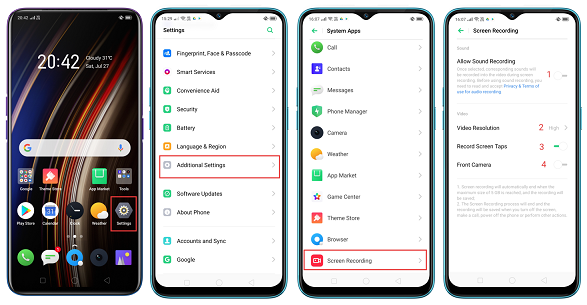
2.2 Settings
Allow Sound Recording
Once selected, corresponding sounds(The sound of the mobile phone speaker and the external environment sound) will be recorded into the video during screen recording. This feature is off by default.
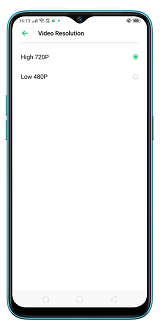
Video Resolution
There are two resolutions can be chosen which 720P and 480P. The setting items are shown in the following (5). Check the corresponding setting items to record the corresponding resolution video.
Record Screen
TapTurn on this function, when the screen is recorded, the contact position of the click position will appear on the screen, as shown below (6).This feature makes it easy to record the current steps when recording.
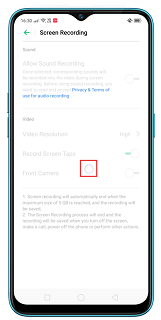
Front Camera
Turn on this function, when the screen is recorded, the front camera video will appear on the screen.
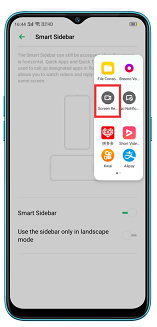
2.3 Path
① Pull down the status bar
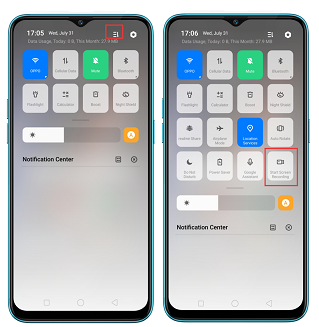
② Slide out the smart sidebar
3. Note
3.1 When recording the screen, the recording function of other software is not available, such as WeChat sending voice messages, camera shooting videos, etc..
3.2 If there is no sound on the recording screen, confirm whether the recording is allowed to be recorded, and check if it has been occupied by other applications before recording (for example, the mobile phone sound recording function is turned on);
3.3 The Screen recording will end and the recording will be saved when you turn off the screen, make a call, power off the phone or perform other actions.
3.4 The maximum value of the recording screen is 5G, when reaches it,the recording will be interrupted and saved.
3.5 When recording the screen, the input password interface will be recorded on the black screen to protect the user's privacy;
3.6 The overseas version cannot be uninstalled.