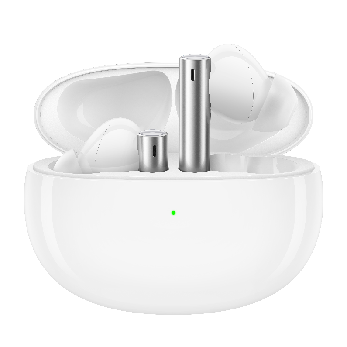
1. The earphone is connected to the phone for the first time.
Turn on the earphone, press and hold the multi-function button for 3s to enter "pairing mode".
* Different earphones have different operation methods, please refer to the specific model.
The indicator light flashes, turn on the Bluetooth of the phone to search. Find the earphone you want to connect and click connect.
If it cannot be found, you can usually try the following methods to reconnect:
A. Re-open the Bluetooth switch of the phone.
B. After the earphone is turned off, restart and set it to enter "pairing mode".
C. If there are many Bluetooth devices displayed in the Bluetooth list of the phone, it is recommended to go to an area with little interference and try to connect again.
D. If you still cannot search after the above actions, you can use other phones to search for comparison, so as to check if the default headset causes all phones cannot search for earphones. If it is confirmed that only the realme earphone you use cannot be searched, it is recommended that you visit the realme service center for help.
2. The earphone has been paired to the phone, but the connection fails, you can try the following methods
Turn on the Bluetooth switch of the phone again and try to reconnect.
Turn off the earphone or put the earphone into the charging case, close the case and reopen it.
Restore factory settings. Press and hold the multi-function button for more than 10s, and try to reconnect.
If the above operation fails many times, you can delete the device by clicking the information button ⓘ. After that, perform the search connection again, and refer to the first part for the search connection method. The following is an example of a phone deleting a paired realme Buds Air Pro device.
If the Bluetooth earphone has been connected to multiple phones, the Bluetooth earphone can only automatically connect to the last connected phone. Other connected phones need to be reconnected in the Bluetooth list.
3. If the above operations are completed, the phone and the earphone still cannot be connected normally
If the above methods cannot solve your problem, please bring your purchase certificate to the realme customer service center.
4. How to enter pairing mode with realme earphones?
Note: For other brands of Bluetooth earphones, please consult the corresponding manufacturers.
Pictures | Bluetooth ear- phone model | Pairing method |
realme Buds Air T300 | First use: Open the charging compartment cover and automatically enter pairing mode. Manual pairing mode: If the automatic pairing mode is not entered after opening the cover, put on the earphones,press and hold the touch area with both hands for 5 seconds, and when you hear the pairing prompt tone, you will enter the manual pairing mode. | |
realme Buds Air 5 | Bluetooth pairing: Keep both earphones in the box and open the lid. Press and hold the function button of the charging box for 3 seconds to enter pairing mode. Connect to a realme phone: Please turn on the phone's Bluetooth, open the earphone charging box and get close to it, and follow the pop-up instructions on the screen. Connect to other phones:Please turn on the Bluetooth, open the earphone charging box and get close to it, enter the Bluetooth settings of the phone, search, and connect: realme Buds Air5 | |
realme Buds Air 5 Pro | Bluetooth pairing: Keep both earphones in the box and open the lid. Press and hold the function button of the charging box for 3 seconds to enter pairing mode. Connect to a realme phone: Please turn on the phone's Bluetooth, open the earphone charging box and get close to it, and follow the pop-up instructions on the screen. Connect to other phones: Please turn on the Bluetooth, open the earphone charging box and get close to it, enter the Bluetooth settings of the phone, search, and connect: realme Buds Air5 Pro. | |
realme Buds Air 3s | First use: Open the charging lid and the earphone auto enters the pairing mode. Bluetooth pairing: Open the charging case, press the pairing button for 3 seconds. The earphone will enter the pairing state. | |
| realme Buds Air 3 | First use: Take out the earphones, tear off the separator on the charging contacts, and put both earphones in the charging case. Pairing mode: Open the top cover of the charging case, and keep the earphone in the charging case. Press and hold the multi-function button for 3s, the earphone enters the Bluetooth pairing state, and the green indicator flashes; |
realme Buds Air | First use: Take out the earphones, tear off the separator on the charging contacts, and put both earphones in the charging case. Bluetooth pairing: Open the charging case, press the pairing button for 3 seconds. The earphone will enter the pairing state, at this time, the green indicator light of the charging case will flash for 10 seconds. Turn on the device's Bluetooth to search, find the realme Buds Air, and click connect. | |
realme Buds Q2s | First use: Open the earphone case, and the earphones will automatically enter pairing mode. Bluetooth connection: Open the phone's Bluetooth list, find "realme Buds Q2s", and tap to connect. Manual pairing mode: If the pairing mode is not automatically entered after opening the case, you can choose the manual pairing mode: take out the two earphones from the charging case, touch both earphones with both hands for 5 seconds, and the earphones will enter the pairing mode. | |
realme Buds Q2 | First use: Take out the earphones, tear off the separator on the charging contacts, and put both earphones in the charging case. Pairing mode: Take the two earphones out of the charging case. If the device is not connected within 15 seconds, it will enter the pairing mode; when the earphone is connected to the phone, disconnect the Bluetooth connection from the phone and the earphone will enter the pairing mode; keep the two earphones charging in the case, long-press the touch area of the two earphones for more than 5s to enter the pairing mode. | |
| realme Buds Air Neo | First use: Take out the earphones, tear off the separator on the charging contacts, and put both earphones in the charging case. Bluetooth pairing: Open the charging case, press the pairing button for 3 seconds. The earphone will enter the pairing state, at this time, the green indicator light of the charging case will flash for 10 seconds. Turn on the device's Bluetooth to search, find the realme Buds Air Neo, and click connect. |
| realme Buds Q | First use: Take out the earphones, tear off the separator on the charging contacts, and put both earphones in the charging case. Pairing mode: Take the two earphones out of the charging case. If the device is not connected within 15 seconds, it will enter the pairing mode; when the earphone is connected to the phone, disconnect the Bluetooth connection from the phone and the earphone will enter the pairing mode; keep the two earphones charging in the case, long-press the touch area of the two earphones for more than 5s to enter the pairing mode. |
| realme Buds Air Pro | First use: Take out the earphones, tear off the separator on the charging contacts, and put both earphones in the charging case. Pairing mode: Open the top cover of the charging case, keep the earphone in the charging case. Press and hold the multi-function button for 3s, the earphone enters the Bluetooth pairing state, and the green indicator flashes; |
| realme Buds Air 2 | First use: Take out the earphones, tear off the separator on the charging contacts, and put both earphones in the charging case. Pairing mode: Open the top cover of the charging case, keep the earphone in the charging case. Press and hold the multi-function button for 3s, the earphone enters the Bluetooth pairing state. After the pairing record has been established, open the top cover of the charging case and the earphone will automatically connect. |
| realme Buds Air 2 Neo | First use: Take out the earphones, tear off the separator on the charging contacts, and put both earphones in the charging case. Pairing mode: Open the top cover of the charging case, and keep the earphone in the charging case. Press and hold the multi-function button for 3s, the indicator light flashes green, and the earphone enters the Bluetooth pairing state. Bluetooth pairing: Bluetooth search to "realme Buds Air 2 Neo" and complete the pairing. After the pairing record has been established, open the top cover of the charging case and the earphone will automatically connect. |
realme Buds Air 3 Neo | First use: Open the charging case and automatically enter pairing mode Manual pairing mode: Take the two earphones out of the chargingcase and press the touch area with both hands for 5 seconds at the same time. The earphone can also enter the pairing mode manually. Bluetooth pairing: Bluetooth search to "realme Buds Air 3 Neo" and complete the pairing. After the pairing record has been established, open the top cover of the charging case and the earphone will automatically connect. | |
realme TechLife Buds T100 | Automatic pairing mode First use: Open the charging lid and the earphone automatically enters the pairing mode. Manual pairing mode: Take the two earbuds out of the charging case and press the touch area with both fingers for 5 seconds at the same time. The earphone can also enter the pairing mode manually. | |
realme Buds Wireless 3 | Power on: Separate the earphone, automatically power on; | |
| realme Buds Wireless 2 | Power on: Separate the earphone, automatically power on; |
| realme Buds Wireless 2 Neo | Power on: Separate the earphone, automatically power on; |
realme Buds Wireless Pro | Power on: Separate the earphone, automatically power on; |