If you need to upgrade the Windows 10 Home Edition system that comes with your computer to the Professional Edition, you need to go to Microsoft's official channels to purchase the genuine Windows 10 Professional Edition system.
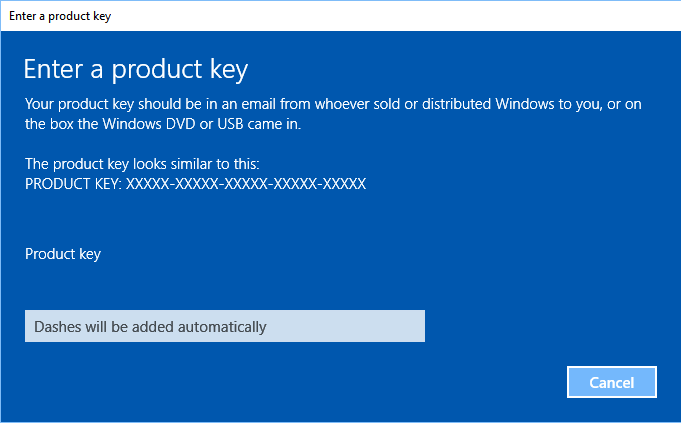
Before upgrading, you need to prepare a product key for Windows 10 Pro. The product key should be in the email order sent to you by the Windows seller or reseller, or on the Windows DVD or USB box.
1. The computer is pre-installed with Windows 10 Home Edition. The original factory version is more stable. Upgrading to the professional version may cause compatibility problems.
2. Generally, you will not lose your files when upgrading the system, but to avoid accidents, you can back up important files to external storage before upgrading to avoid losing your important files.
3. For more operation details, you can visit the Microsoft official website to learn:
4. If there is a failure during the upgrade process, please contact Microsoft's official channels, such as mobile phone to call Microsoft's official customer service.
Operation steps:
1. Click the Windows Start icon > Settings icon and select Update & Security.
2. Click Activation > Change Product Key.
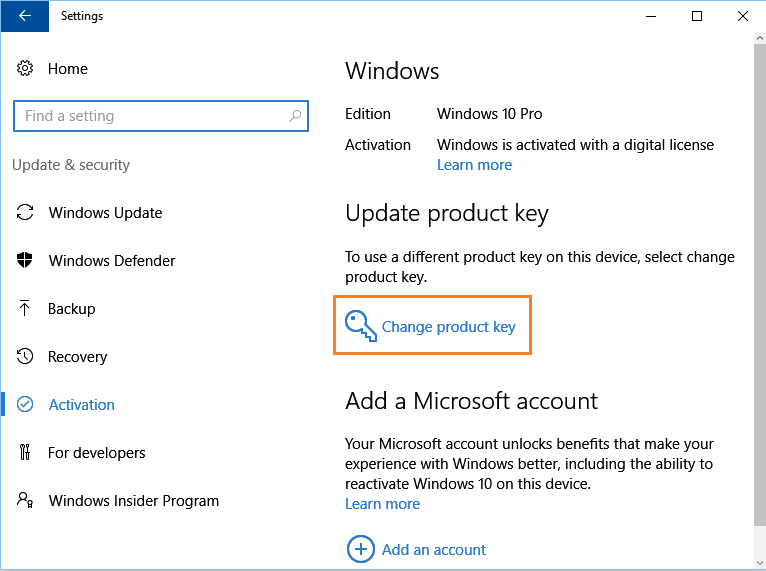
3. Enter the product key, click Next, and then follow the prompts to activate Windows 10 Pro.