realmeparts

Laptop camera does not work

6,468 views
7 likes
Official Source
laptop

Problem phenomenon:

After using the Win 10 camera function, the shooting screen cannot be displayed normally, as shown below:

laptop camera not working

Solution:

This PC > Management > Device Manager > Detect Driver.

If the abnormal yellow exclamation mark appears in the driver, it is recommended to update the driver.
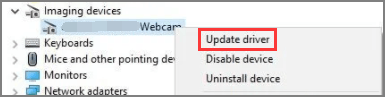
update driver


Check the privacy in the settings, and whether the camera option has turned off "Allow apps to access your camera", if so, just turn on it.

Allow app access to your camera


Article Reference

Official Realme documented guide #2072568

View on realme.com

Related Topics

#laptop camera not turn on#laptop camera does not work#camera doesn't work on windows#how to fix laptop camera not working#camera not working on windows 10

Was this article helpful?

Your feedback helps us improve our support content.

Still need help?

Explore more articles or contact our customer support team for personlized assistance.

Visit Support Hub