If the phone cannot recognize the SD card, it is recommended that you follow the steps to troubleshoot:
1. Please turn off your phone and try again;
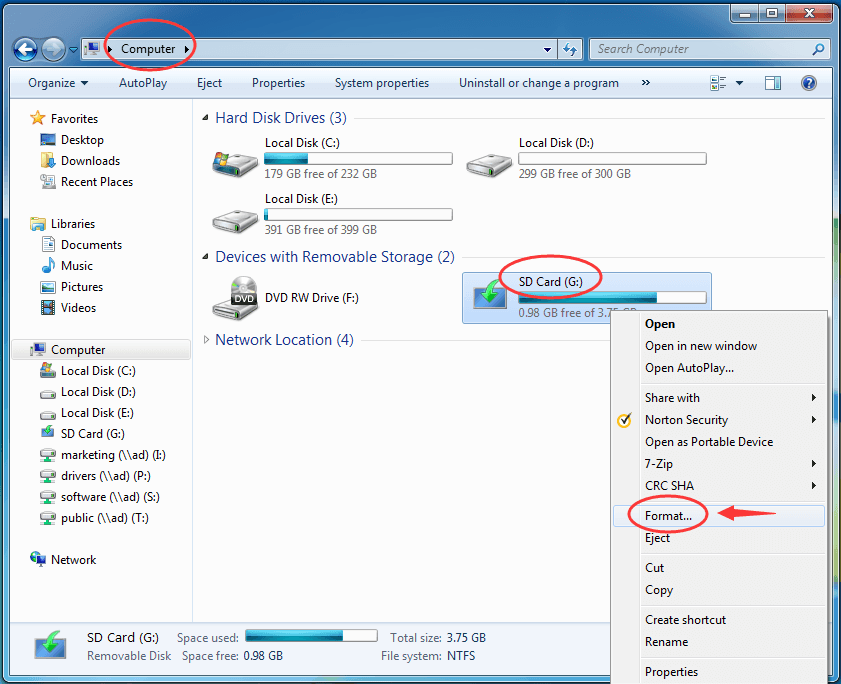
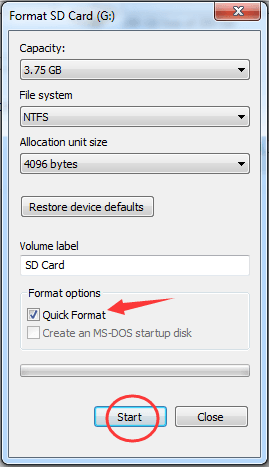
2. It is recommended that you use a card reader to insert the SD card into the USB port of the computer. Back up the data in the SD card; format the SD card and then try to use it.
(Operation steps: select the corresponding memory disk> right click and select format> pop-up window select start);
3. It is recommended that you check the capacity of the memory card, whether it is within the maximum space that the corresponding model can support the expansion card;
4. It is recommended that you check whether the memory card is in a format supported by the mobile phone. If not, please use the card reader to insert the SD card of the mobile phone into the USB interface of the computer to convert the format.
(Operation steps: select the corresponding memory disk> right click and select format> popup window to select file system);
5. It is recommended that you put the memory card into other phones and observe whether it can be used normally (check whether the SD card is damaged).
If the above methods cannot solve your problem, please bring your purchase certificate to the realme service center for testing.